
Stop the madness! In my 20+ years of coaching Agile Teams and orgs, this is one of the most pervasive and disheartening aspects I have seen.
The Pervasive Situation
Take a good look at your Team backlogs. Chances are they are replete with technical tasks. The work item name typically gives it away – “Implement the ABC method”, “Code the retry API”, “Insert the new DB record”. And you may even see a weak attempt to follow some learned syntax with “As a developer, I want to code the XYZ, so our project remains on track.” Stop the madness!
Why This is Bad
If this is your world, then you are flowing parts & pieces, not value. We want to flow VALUE, not parts and pieces that have to be integrated somewhere down the line at a later date. While technical tasks are certainly important, they are not valuable in and of themselves. Completing a technical task to Done says nothing about what other technical parts and pieces must be combined to it in order to have something valuable for the User.
The Story Technique Everyone Needs to Understand!
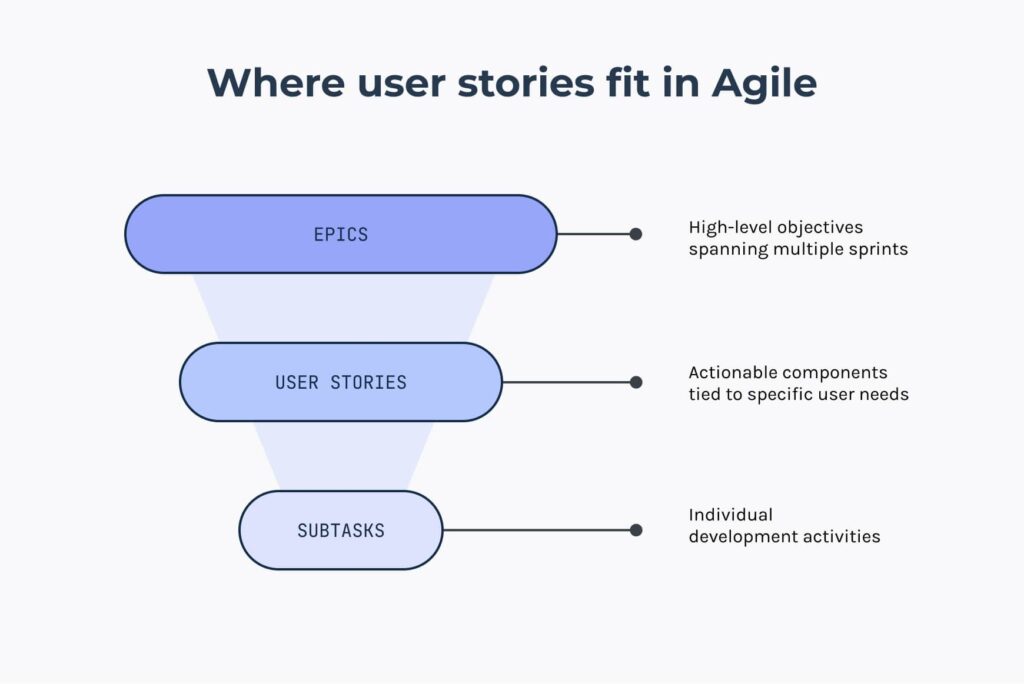
The Story technique is this: model your work items as thin vertical slices of value from the User’s perspective (check out the INVEST guidance from Bill Wake). Think of User-initiated actions. It’s not really that hard. For example, “View the Reconciliation Report” with a description such as (syntax not important) “As a CPA, I want to view the Reconciliation Report, so that I can assess the level of adjustments needed.” Notice the User Story is written from the User’s perspective, not the Developer’s perspective!
Sure Mike, but then where do we capture the coding, testing, and integration tasks? Glad you asked…
Technical tasks go inside the User Story. They are the technical “how” elaboration for the User Story in the form of coding/testing actions. In other words, technical tasks answer this question: “For us to complete this specific User Story, what coding and testing tasks do we need to meet our definition of done?”
Technical tasks should be within each User Story. Say that again for the folks in the back! Within each User Story. Not as separate work items themselves.
Enabler Stories
“But wait Mike, not all work items are about the User! Sometimes we need to improve our CI/CD pipeline, or perform a research spike.” Absolutely true. Those are called Enabler Stories. They are valuable to our Team/Org. They are invisible to the User, but they still are needed for obvious reasons. Thus all Stories, User or Enabler, have value.
Making the Case
Here’s how you can make the case for using real Stories instead of technical tasks in your Team backlog:
- We want to flow VALUE, not pieces & parts. Real Stories (both User Stories and Enabler Stories) are valuable.
- Swarming and Pairing are natural dynamics when real User Stories are used as the User Stories represent a thin vertical slice of value. This is good because studies show this results in higher throughput levels, integration as we go, and lots of learning/mentoring opportunities.
- If real User Stories are used, then we can install WIP Limits to promote focus, lower cycle time, and higher throughput. Using WIP Limits on technical tasks doesn’t make a lot of sense as most technical tasks are worked on by a single Developer.
- If real User Stories are used, then we can capture meaningful Team-level Flow Metrics (lead time, cycle time, throughput rate, etc.) and improve these over time by running experiments. Measuring technical tasks does not make sense as we don’t know what parts & pieces have to be combined to represent value.
- Decomposing Features into real User Stories empathizes with the User. This is a good thing. When we skip this step and immediately go to technical tasks then we are jumping into Solutioning mode with very little understanding of the “who” and “why”. Write a one-sentence description such as “As a <role>, I want <functionality>, so that <business value>. Then add acceptance criteria. – That’s it. It’s really that simple!
- Having a valuable User Story with good AC makes it relatively easy to split a big Story into smaller ones by just looking at the AC.
Wrapping Up
Thanks, I hope this helps someone out there struggling with a Team backlog full of technical tasks.
Explore these resources for more insights: